Testing Air Canada’s Free and Paid In-Flight Wi-Fi
THIS POST IS ALSO AVAILABLE IN 한국어.

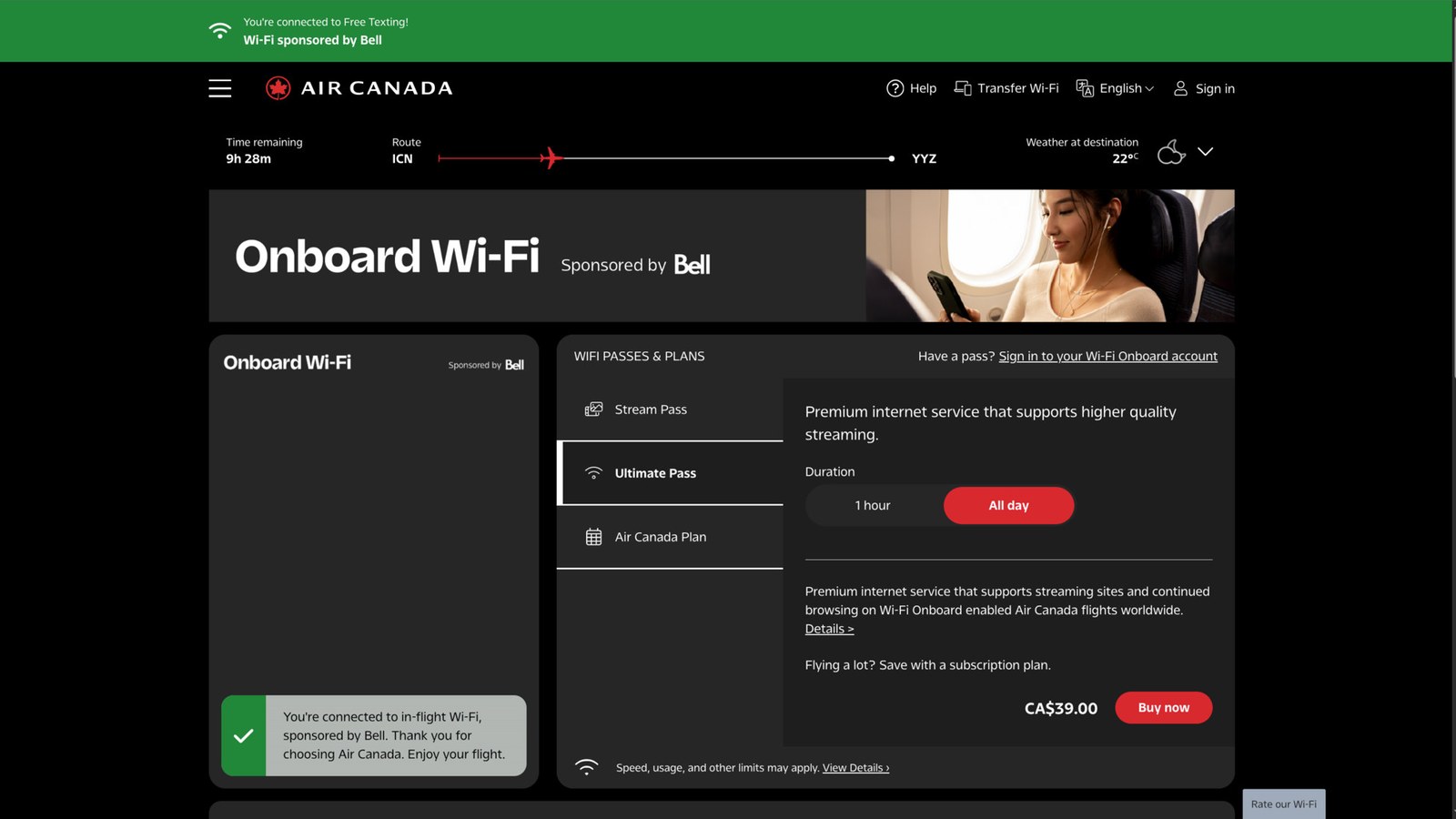
On August 17, 2026, I boarded Air Canada flight AC62 from Seoul Incheon to Toronto. It was a Boeing 787-9, and the actual aircraft registration was C-FVLX. After connecting to the in-flight Wi-Fi and opening ACWiFi.com, I was shown a passenger login screen. I entered my last name and seat number, which activated the free access. The next screen said “You’re connected to Free Texting.” This was complimentary messaging on a long-haul international flight. Most of the general web did not open, and the portal sold a separate pass for full internet access.
Unexpectedly, I could have real conversations with both Grok and ChatGPT, on the web and in their mobile apps. Grok Build and Claude Code also worked, letting me continue reading and editing local files. GitHub, Gmail, Slack, and YouTube, however, were blocked. In OpenCode, the OpenAI provider worked while Fireworks and Cerebras failed.
Why did AI seem to be the exception? On the same flight, I checked reachability for more than 40 domains, along with latency, upload throughput, and download throughput.
The short version
- The observations best fit a restricted connection that allowed specific domains, not free access to the entire internet.
- Grok and ChatGPT worked as both web and mobile apps.
- In addition to free-messaging services, major AI API domains such as
api.x.ai,api.anthropic.com, andapi.openai.comwere reachable. - GitHub, Google, Gmail, Slack, Discord, YouTube, and several AI infrastructure providers were blocked.
- On allowed hosts, HTTP round-trip latency was about 750–800ms, upload throughput was 1.2–1.8Mbps, and a conservative download estimate was 5–7Mbps.
- After I bought the CA$39 Ultimate Pass, the destination restrictions disappeared, but Fast.com still measured only about 5Mbps.
- Bandwidth was limited, but token streams are small. The connection was surprisingly usable for AI web services, mobile apps, and AI command-line tools.
It was free messaging, not free internet
Air Canada’s official information says it offers free streaming-quality Wi-Fi on North American and Sun routes, with free Wi-Fi for long-haul international routes planned for 2026. On long-haul flights, Aeroplan members receive free messaging through services including iMessage, Messenger, WhatsApp, WeChat, LINE, KakaoTalk, and Telegram, but photos, videos, and attachments are not supported.[1]
The portal on my AC62 flight matched that description. A green banner at the top said Free Texting, while the Ultimate Pass for full internet access was a separate product. So the “free in-flight Wi-Fi” in this article was officially a restricted connection intended for messaging.
What made it interesting was that the observed reachability pattern extended beyond messaging apps: the web and API hosts used by several major conversational AI services were also reachable.
What worked and what was blocked
I separated services I actually used from hosts for which I checked only HTTPS reachability with curl and openssl. HTTP 401, 403, 404, or 421 responses meant that TLS had reached the origin or CDN, so I classified the host as reachable. They do not prove that every feature of the corresponding web application worked.
| Category | Service or domain | Result |
|---|---|---|
| Working app | Grok and ChatGPT web apps | Real conversations worked in both apps |
| Working app | Grok and ChatGPT mobile apps | Real conversations worked in both apps |
| Working app | Grok Build (api.x.ai) | Model conversation and tool loop worked |
| Working app | Claude Code (api.anthropic.com) | Model conversation and local file operations worked |
| Working app | OpenCode + OpenAI (api.openai.com) | gpt-5.5 returned a response |
| HTTPS reachable | Gemini, Perplexity, Copilot | Primary hosts passed TLS/HTTP; full interfaces could still depend on additional domains |
| Free messaging | WhatsApp, Messenger, Telegram, LINE, KakaoTalk, iMessage APNs | Text-related hosts were reachable |
| Partially reachable | en.wikipedia.org | Article HTML loaded, but the image host was blocked |
| AI infrastructure blocked | Fireworks, Cerebras, OpenRouter, Cursor, OpenCode model list | Connection ended during TLS |
| General internet blocked | GitHub, Google, Gmail, Slack, Discord, YouTube, Netflix, x.com | Connection ended during TLS |
In OpenCode, I sent the same 안녕 (“hello”) prompt while changing only the provider. GLM through Fireworks and Gemma through Cerebras failed with unknown certificate verification error, while GPT-5.5 through OpenAI answered immediately. The message looked like a certificate-store problem, but an immediate curl test to the same blocked hosts returned TLS unexpected eof. In this case, the runtime was surfacing a connection that was terminated for hosts that were not reachable on the free tier.
The observed reachability pattern was granular at the subdomain level, rather than simply by company. gemini.google.com was reachable while www.google.com and mail.google.com were blocked. Text from en.wikipedia.org downloaded, but its images broke because upload.wikimedia.org was blocked. courier.push.apple.com was reachable while gateway.icloud.com was not, which was also consistent with access intended for messages but not attachments or general iCloud data.
How fast was it?
On the free tier, general speed-test sites such as Fast.com were outside the apparent allowlist. Instead, I repeatedly transferred small payloads to AI APIs and grok.com, after confirming that those destinations were reachable.
| Metric | Measurement | Interpretation |
|---|---|---|
| TCP connection | Usually 5–20ms | A local response from the onboard gateway, not the satellite RTT |
| New TLS connection | 0.8–0.9 seconds | Roughly one satellite round trip |
| Keep-alive HTTP RTT | 0.74–0.80 seconds | The actual round trip after connection reuse |
| Upload | 1.2–1.8Mbps | 256KiB API POST, raw throughput including RTT |
| Download | 5–7Mbps | About 814KiB from grok.com, keep-alive raw throughput |
For upload tests, I used unauthenticated dummy POST bodies. xAI returned HTTP 415 and Anthropic returned 401, which showed that each request body had reached the origin before being rejected. API responses were too small for useful download tests, so I supplemented them with about 814KiB of HTML from grok.com.
The second and third downloads sometimes showed an apparent 80–100Mbps after the first byte. I discarded those values because the pipe may have filled during time to first byte, or an intermediate cache or socket buffer may have been involved. The headline figure uses only the conservative 5–7Mbps measured over the full transfer time.
I did not interpret AI chat response time as network speed, either, because it includes model token-generation time. What I could isolate was this: round trips were long at about 0.8 seconds, large transfers were slow, but there was enough bandwidth to maintain long-lived streams.
Why AI services and command-line tools were surprisingly usable
A web page is rarely just one HTML request. It loads JavaScript, images, fonts, login services, analytics, and CDNs from multiple hosts. Even if the primary domain is reachable, one blocked dependency can leave part of the interface stuck.
Even so, I could have real conversations with Grok and ChatGPT both on the web and in their mobile apps. That proves more than TLS reachability to a primary host: in an authenticated session, I could send a question and receive an answer through the core path. I did not, however, trace every secondary host called by the mobile apps.
Model calls from command-line tools such as Grok Build and Claude Code were structurally simpler.
- They needed only one or two primary destinations, such as
api.x.aiorapi.anthropic.com. - Requests and token streams were much smaller than video or a large web page.
- Once a TLS connection was established, a long-lived SSE stream did not pay the 0.8-second round-trip cost for every token.
- File reads, edits, and tests ran locally on the laptop and did not use the in-flight connection.
- A web lookup performed by an agent’s backend followed a different path from the laptop directly visiting that website.
This created the odd situation where “much of the internet is blocked, but the AI can still search it.” My laptop could access Wikipedia only partially and could not open much of the general web, yet I could ask through a reachable AI API and receive an answer after the model provider’s server retrieved the information.
The limits were still obvious. I could edit local code with a model, but I could not pull from or push to GitHub. Package installation, Slack, and Gmail were also blocked. AI collaboration worked, but this was not a complete internet-connected development environment.
Grok felt faster than ChatGPT, but the network path was similar
On the same flight, the Grok app felt faster than the ChatGPT app. At first I wondered whether xAI had a better global path. Direct comparison showed that api.x.ai and grok.com, as well as api.openai.com and chatgpt.com, all used Cloudflare anycast. Their API TLS times, keep-alive RTTs, and 256KiB upload results were similar.
I found no evidence of a uniquely fast backbone used only by Grok across the satellite segment. Instead, ChatGPT’s secondary hosts showed cold DNS lookups, longer initial TLS setup, and a Cloudflare challenge. The perceived difference is more naturally explained by model token speed, the number of secondary hosts each app calls, initial connection setup, and challenge handling. I did not instrument the internals of either app, so I cannot assign the cause to one factor.
Scope and limitations
- Flight: Air Canada AC62, ICN→YYZ, August 17, 2026; Boeing 787-9, aircraft registration
C-FVLX - Access:
ACWiFi.com, Free Texting tier, Intelsat Wi-Fi Onboard portal - Tools:
curl,openssl s_client, and a small keep-alive HTTP client - Domain tests: TLS/HTTP results for more than 40 hosts
- Transfer samples: up to 256KiB upload and about 814KiB download
- Fast.com after buying Ultimate Pass: about 5Mbps
- End-to-end app tests: Grok and ChatGPT web and mobile apps; Grok Build; Claude Code; and OpenCode switched among OpenAI, Fireworks, and Cerebras
These results describe one moment on one aircraft, C-FVLX, operating AC62 on August 17, 2026. The same flight number can be operated by a different registration on another day, and connectivity hardware or configuration can vary by aircraft. The airline or service provider can also change its policy. A host returning HTTP 403 or 421 proved network reachability, not complete web-app functionality. The free-tier file samples were small, and the Ultimate Pass Fast.com reading was taken at one point in time, so I would not generalize 5–7Mbps to other AC62 flights or to the entire duration of this one.
This investigation was intended to understand why tools that already worked were working. I did not attempt or document methods to bypass the free tier for general internet access.
Finally, I bought the AI an Ultimate Pass
On the free onboard connection, everything from the Grok and ChatGPT web and mobile apps to Claude Code and Grok Build actually worked. The AI tools did not need a special networking trick: their core domains were reachable through the onboard network, and token streams did not require much bandwidth.
Once I had established that, I started doing real work with the AI. Reading local files, organizing ideas, and editing code all went smoothly. The problem was that, as the work progressed, the AI began asking to search other websites and retrieve material outside the free tier. The AI seemed to become frustrated with the in-flight internet before I did.
So I bought the CA$39 Ultimate Pass shown in the portal. More precisely, I was not buying internet for myself so much as providing paid internet to the AI. As soon as payment completed, the previously blocked general websites and Fast.com became reachable.
Despite the name, the speed did not become Ultimate. Fast.com showed about 5Mbps, effectively the same as the 5–7Mbps I had measured through other methods on the free tier. Paying did not make the connection faster; it removed the destination restrictions.
The AI could no longer say, “I can’t reach that site.” I thought I had also lost my excuse to sleep. I still managed to get a solid three hours of sleep. As I revise this article, there is one hour left until landing in Toronto. After sleeping for three hours, it is time to spend the final hour working with the AI again.